
AI Agent Orchestration: How Multi-Agent Systems Work
Most companies don't have an "AI agent" problem — they have five or six of them, built by different teams, none of which talk to each other. One agent triages support tickets, another drafts contracts, a third watches for fraud signals, and nobody can say what happens when two of them need to act on the same request in sequence. Orchestration is the layer that fixes that: it's the difference between a pile of clever bots and a system you can actually run a business on.
What "agent orchestration" actually means
An individual AI agent is good at one narrow job — read this document, classify this ticket, draft this reply. Orchestration is the coordination layer above those agents: it decides which agent handles a request, in what order, with what context passed between steps, and when a human needs to step in. Without it, every new agent you add is another manual integration. With it, agents become composable — you can add, remove, or swap one out without rebuilding the whole pipeline.
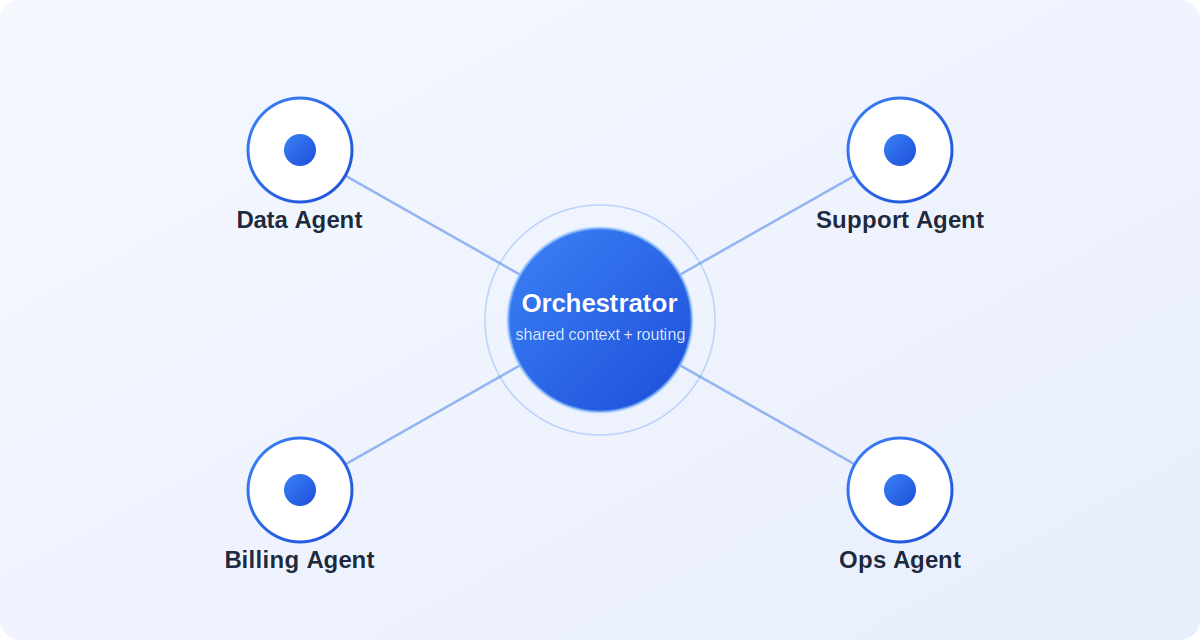
The orchestrator itself usually isn't doing the domain work — it's routing, sequencing, and holding the shared context so the data-extraction agent and the support agent aren't working from two different versions of the truth.
How a request moves through the system
Take a fairly ordinary enterprise workflow: a customer emails in a billing dispute. In a well-orchestrated system, that single email triggers a chain, not a single bot reply.
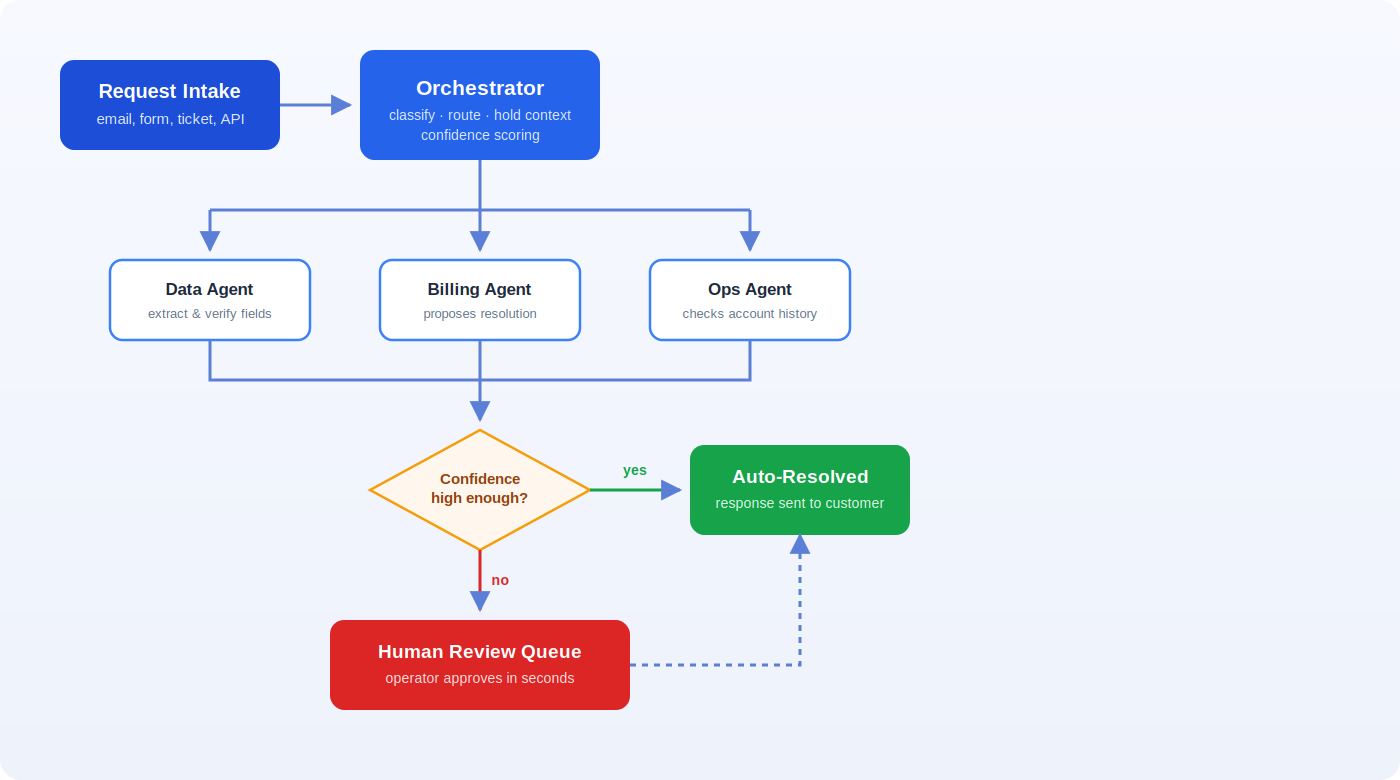
The intake agent classifies the email and extracts structured fields. The orchestrator checks account history and routes it to a billing-specialist agent, which proposes a resolution. If the resolution is under a set dollar threshold and the confidence score is high, it goes straight out. If not, it lands in a queue for a human to approve in seconds rather than write from scratch. That branching logic — auto-resolve versus human review — is the actual product of good orchestration design.
Two orchestration patterns worth knowing
Most real deployments use a mix of two shapes, depending on the task.
Sequential handoffs
One agent's output becomes the next agent's input, in a fixed order — extract, then validate, then decide, then act. This is the right shape when steps genuinely depend on each other and order matters, like the billing example above. It's easy to reason about and easy to insert a human checkpoint anywhere in the chain.
Parallel specialists
Multiple agents work the same request at the same time — one checking fraud signals, one checking inventory, one checking pricing rules — and the orchestrator merges their outputs before deciding. This shape is faster when the checks are independent, but it needs a clear conflict-resolution rule for when two agents disagree.
A quick look at the routing rule
The confidence check from the diagram above is usually just a few lines of logic sitting inside the orchestrator. Something close to this runs on every request:
function routeRequest(request, agentResult) {if (agentResult.confidence >= 0.85 && agentResult.riskScore < 0.2) {return autoResolve(agentResult);}return sendToHumanReview(request, agentResult);}
Note: fenced code blocks like the one above render as a proper code block — monospace font, a dark card styled from the site's own theme tokens, a language label, real syntax-highlighted colors for keywords/strings/functions, and a working copy button. This uses one small library (`prism-react-renderer`) wired up once in `blog.$slug.tsx`; individual posts never need to reference it — just write the fence and the language name.
The language label is whatever you type right after the opening fence — it works the same way for any supported language, no per-post setup required:
def route_request(request, agent_result):if agent_result["confidence"] >= 0.85 and agent_result["risk_score"] < 0.2:return auto_resolve(agent_result)return send_to_human_review(request, agent_result)
Where the monitoring layer earns its keep
The question every operations lead asks after the first pilot is "how do we know it's actually working." That's a monitoring problem, not an AI problem — you need visibility into which agent handled what, how confident it was, how often humans overrode it, and where requests are quietly piling up in a queue.
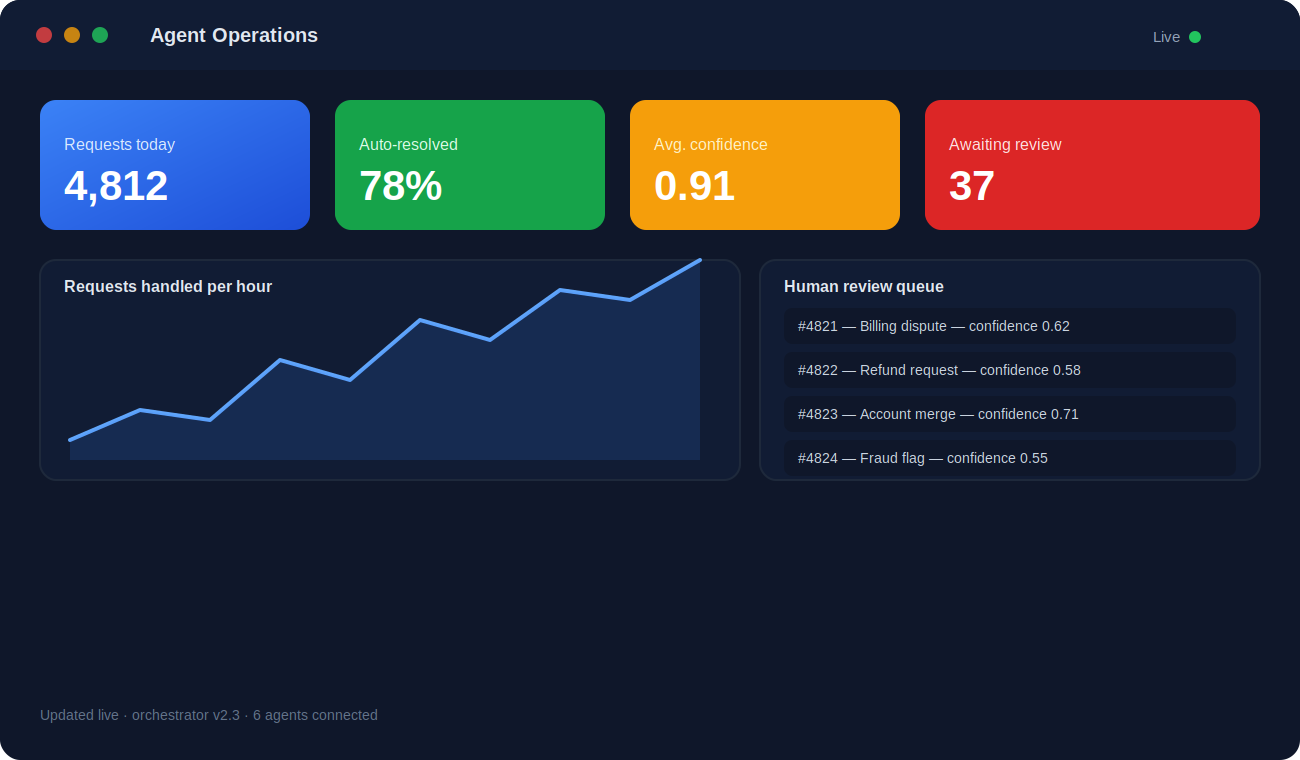
Teams that skip this step tend to find out about a broken agent from a customer complaint instead of a dashboard. The monitoring layer is what turns "we deployed some agents" into "we run a system with an SLA."
Signs your team is ready for this
- 1.You already have two or more point-solution AI tools that don't share data with each other.
- 2.A single customer request routinely touches more than one department or system.
- 3.Your team can describe the manual workflow step by step, including the exceptions.
- 4.Someone owns the outcome of the process today — automation needs a business owner, not just a sponsor.
- 5.You have a way to measure the current baseline, so "better" is provable rather than assumed.
Where these rollouts stall
- Building the orchestrator before defining what "done correctly" looks like for a single request.
- No confidence threshold, so every case either auto-resolves riskily or gets kicked to a human anyway.
- Treating the human-review queue as a temporary crutch instead of a permanent, monitored part of the system.
- Skipping a shared context store, so agents re-ask the customer for information the system already has.
"The orchestration layer isn't the exciting part of the demo, but it's the part that decides whether the system survives contact with real, messy requests."
What the underlying data layer looks like
The orchestrator's confidence check needs real numbers to work with. Under the hood that's usually a plain query against a request log:
SELECT request_id, agent_name, confidence, risk_score, resolved_atFROM agent_decisionsWHERE confidence < 0.85AND resolved_at IS NULLORDER BY created_at ASCLIMIT 50;
Standing the whole thing up is normally just a couple of shell commands and a config file, not a new platform:
npm install @cogneticai/orchestrator-sdkexport ORCHESTRATOR_CONFIDENCE_THRESHOLD=0.85npx orchestrator start --config orchestrator.config.json
{"orchestrator": {"confidenceThreshold": 0.85,"reviewQueue": "billing-disputes","agents": ["data", "billing", "ops"]}}
orchestrator:confidence_threshold: 0.85review_queue: billing-disputesagents:- data- billing- ops
func RouteRequest(req Request, result AgentResult) Decision {if result.Confidence >= 0.85 && result.RiskScore < 0.2 {return AutoResolve(result)}return SendToHumanReview(req, result)}
And if a post ever uses a language outside the highlighted set — Rust, say — it still renders cleanly, just without colored tokens:
fn route_request(confidence: f32, risk_score: f32) -> Decision {
    if confidence >= 0.85 && risk_score < 0.2 {
        Decision::AutoResolve
    } else {
        Decision::HumanReview
    }
}
Getting started without a rebuild
You don't need to replace existing point-solution agents to get the benefit of orchestration — most engagements start by wrapping what's already there. We map one end-to-end workflow, add the routing and confidence logic around the agents you already run, and put a monitoring view in front of the operations team before touching anything else. The rebuild, if there is one, happens later and only where it's actually justified by what the data shows.
Frequently asked questions
Do we need to replace our existing AI tools to add orchestration?
No. Most engagements wrap the agents and tools you already run — we add the routing, shared context, and confidence logic around them rather than rebuilding from scratch.
How do we keep a human in the loop without slowing everything down?
Confidence thresholds. High-confidence, low-risk cases auto-resolve; everything else lands in a monitored review queue where a human approves in seconds instead of starting from a blank page.
What's the first workflow we should orchestrate?
Pick one end-to-end process that already touches more than one system or team — that's usually where the manual coordination cost is highest and the win is easiest to measure.

